
DNS Records Explained: The Complete Guide to Every Record Type
DNS records explained — learn what A, AAAA, MX, CNAME, TXT, NS, SOA, and SRV records do with real examples and configs. Find and fix DNS issues fast.

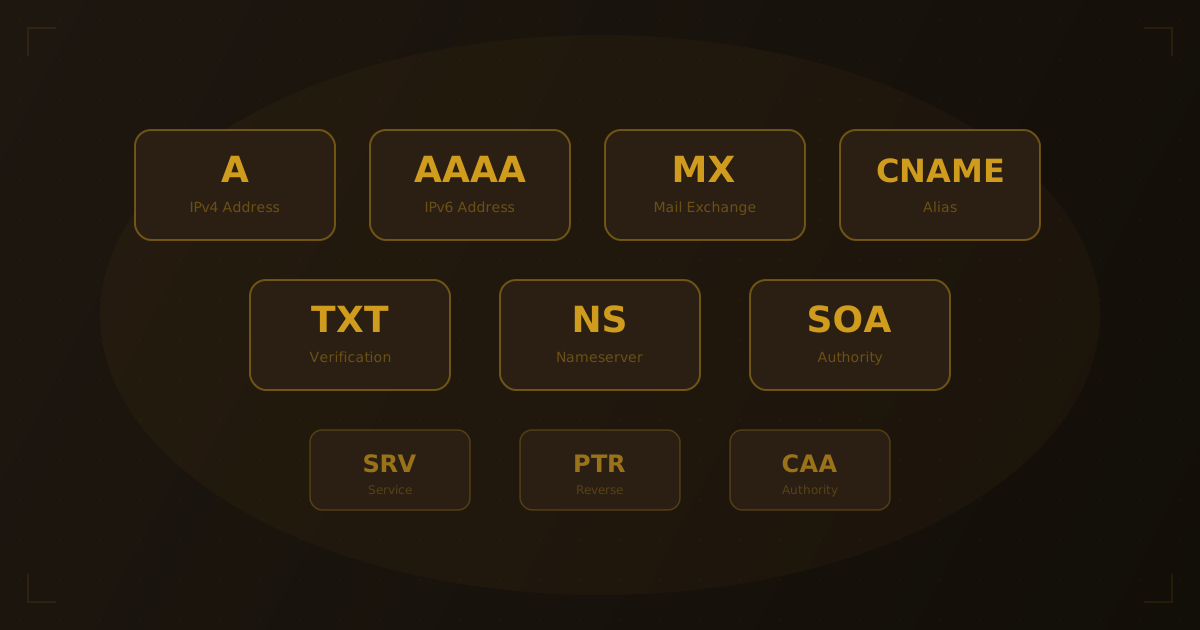
Behind every website, email system, and online service sits a set of DNS records — configuration entries that tell the internet where to route traffic, how to deliver mail, and how to verify domain ownership. Understanding DNS records is fundamental to managing any online presence, yet most guides only scratch the surface. From our experience managing and auditing hundreds of domains, this guide covers every major record type with real-world examples so you can configure, audit, and troubleshoot DNS with confidence.
Quick Answer: DNS records are entries stored on authoritative nameservers that map domain names to IP addresses, mail servers, aliases, and other data. The most common types of DNS records include A (IPv4 address), AAAA (IPv6 address), CNAME (alias), MX (mail server), TXT (verification and security), NS (nameserver delegation), SOA (zone authority), SRV (service location), and PTR (reverse lookup). You can view any domain's records using a DNS lookup tool.
What Are DNS Records?
DNS records are instructions stored in a domain's zone file on its authoritative nameserver. When someone visits your website, sends you an email, or connects to any service on your domain, the DNS system looks up the appropriate record to determine where that request should go.
Each record has four key components:
| Component | Description | Example |
|---|---|---|
| Name | The domain or subdomain the record applies to | example.com or mail.example.com |
| Type | The kind of record (A, MX, CNAME, etc.) | A |
| Value | The data the record points to | 93.184.216.34 |
| TTL | Time to Live — how long resolvers should cache this record (in seconds) | 3600 (1 hour) |
If you're new to DNS, start with our beginner's guide to how DNS works before diving into the individual record types below.
A Record: IPv4 Address Mapping
The A record (Address record) is the most fundamental DNS record type. It maps a domain name to an IPv4 address — the 32-bit numerical address that identifies a server on the internet.
How A records work
When a browser resolves example.com, the DNS system returns the A record's IPv4 address, and the browser connects to that server.
example.com. 3600 IN A 93.184.216.34
Common A record configurations
- Root domain:
example.com → 93.184.216.34 - Subdomain:
blog.example.com → 93.184.216.35 - Multiple A records: Large sites use multiple A records for the same domain to distribute traffic across servers (round-robin DNS)
Most hosting providers give you one or more IP addresses to set as A records when you connect your domain. To find the current A record for any domain, use our DNS lookup tool or run:
dig example.com A +shortTo learn more about website IP addresses and what they reveal, see our guide on how to find your website's IP address.
AAAA Record: IPv6 Address Mapping
The AAAA record (quad-A record) is the IPv6 equivalent of the A record. It maps a domain to a 128-bit IPv6 address, which uses hexadecimal notation separated by colons.
example.com. 3600 IN AAAA 2606:2800:0220:0001:0248:1893:25c8:1946
Why AAAA records matter
IPv4 addresses are limited to approximately 4.3 billion combinations — a pool now fully allocated according to IANA. IPv6 expands the address space to 340 undecillion addresses, ensuring the internet can continue to grow. Major providers including Google, Cloudflare, and Facebook have supported IPv6 for years, and adoption continues to accelerate.
If your hosting provider supports IPv6, add both an A record and an AAAA record. DNS resolvers that support IPv6 will use the AAAA record, while older systems fall back to the A record.
CNAME Record: Domain Aliases
A CNAME record (Canonical Name record) creates an alias that points one domain name to another domain name — not to an IP address. The DNS resolver then follows the chain to resolve the final IP.
www.example.com. 3600 IN CNAME example.com.
How CNAME records work
When a resolver looks up www.example.com and finds a CNAME pointing to example.com, it performs a second lookup on example.com to get the A or AAAA record with the actual IP address.
Common CNAME uses
| Use Case | CNAME Example |
|---|---|
| www subdomain | www.example.com → example.com |
| CDN routing | cdn.example.com → d1234.cloudfront.net |
| SaaS platforms | blog.example.com → custom.ghost.io |
| Email services | mail.example.com → ghs.google.com |
CNAME restrictions
- A CNAME record cannot coexist with other record types for the same name. You cannot have both a CNAME and an MX record on
example.com. - A CNAME record cannot be set on the root domain (
example.com) in standard DNS. Some providers offer proprietary workarounds — Cloudflare calls it "CNAME flattening," AWS Route 53 uses "alias records."
MX Record: Mail Server Routing
MX records (Mail Exchange records) specify which mail servers accept email for your domain and in what order of priority.
example.com.    3600    IN    MX    10 mail1.example.com.
example.com.    3600    IN    MX    20 mail2.example.com.
How MX priority works
The number before the mail server hostname is the priority value. Lower numbers indicate higher priority. In the example above, mail first goes to mail1.example.com (priority 10). If that server is unreachable, delivery falls back to mail2.example.com (priority 20).
MX records for common email providers
| Provider | MX Records |
|---|---|
| Google Workspace | ASPMX.L.GOOGLE.COM (priority 1), plus 4 backup servers |
| Microsoft 365 | [tenant].mail.protection.outlook.com (priority 0) |
| Zoho Mail | mx.zoho.com (priority 10), mx2.zoho.com (priority 20) |
| ProtonMail | mail.protonmail.ch (priority 5), mailsec.protonmail.ch (priority 10) |
Incorrect MX records are one of the most common causes of email delivery failures. If email isn't arriving, checking MX records should be your first troubleshooting step. Learn more in our guide on how to check MX records.
TXT Record: Text Data and Verification
TXT records store arbitrary text data associated with a domain. While originally designed for human-readable notes, TXT records now serve critical roles in email security, domain verification, and policy enforcement.
SPF (Sender Policy Framework)
SPF tells receiving mail servers which IP addresses and servers are authorized to send email on behalf of your domain. This prevents spammers from forging your domain in the "From" address.
example.com. 3600 IN TXT "v=spf1 include:_spf.google.com ~all"
This record says: "Only Google's mail servers can send email for example.com. Soft-fail everything else."
DKIM (DomainKeys Identified Mail)
DKIM adds a cryptographic signature to outgoing email that receiving servers can verify using a public key stored in a TXT record.
google._domainkey.example.com. 3600 IN TXT "v=DKIM1; k=rsa; p=MIIBIjANBg..."
DMARC (Domain-based Message Authentication)
DMARC builds on SPF and DKIM to define a policy for handling email that fails authentication checks.
_dmarc.example.com. 3600 IN TXT "v=DMARC1; p=reject; rua=mailto:[email protected]"
Domain verification
Services like Google Search Console, Microsoft 365, and various SaaS platforms use TXT records to verify domain ownership:
example.com. 3600 IN TXT "google-site-verification=abc123xyz..."
NS Record: Nameserver Delegation
NS records (Name Server records) specify which nameservers are authoritative for a domain — meaning which servers hold the definitive DNS records for that zone.
example.com.    86400    IN    NS    ns1.provider.com.
example.com.    86400    IN    NS    ns2.provider.com.
How NS records work
When you register a domain and point it to a hosting provider's nameservers, you're updating the NS records at the domain registrar level. From that point, all DNS queries for your domain are directed to those nameservers.
Key facts about NS records
- Every domain must have at least two NS records for redundancy
- NS records typically have a long TTL (24-48 hours) because nameserver changes are infrequent and high-impact
- Changing NS records effectively migrates your entire DNS configuration to a new provider
- NS record changes can take 24-48 hours to fully propagate worldwide
SOA Record: Zone Authority
The SOA record (Start of Authority) is a mandatory record at the top of every DNS zone. It identifies the primary nameserver for the zone, the administrator's email address, and timing parameters that control how secondary nameservers synchronize.
example.com.    86400    IN    SOA    ns1.provider.com. admin.example.com. (
    2026031901  ; Serial number
    3600        ; Refresh interval (1 hour)
    900         ; Retry interval (15 minutes)
    1209600     ; Expire time (2 weeks)
    86400       ; Minimum TTL (1 day)
)
SOA record fields
| Field | Purpose |
|---|---|
| Primary NS | The main nameserver for the zone |
| Admin email | Administrator contact (the @ is replaced with a .) |
| Serial | Version number — incremented on every zone change |
| Refresh | How often secondary nameservers check for updates |
| Retry | How long to wait before retrying a failed refresh |
| Expire | How long secondary servers serve cached data if the primary is unreachable |
| Minimum TTL | Default TTL for negative caching (NXDOMAIN responses) |
You rarely need to edit SOA records directly — most DNS providers manage them automatically. However, understanding the serial number is important: if you make a DNS change and it doesn't propagate, a stale serial number on the SOA may be the cause.
SRV Record: Service Location
SRV records (Service records) define the hostname and port for specific network services. Unlike A or CNAME records that map domains to servers, SRV records also specify which port and protocol a service runs on.
_sip._tcp.example.com. 3600 IN SRV 10 60 5060 sipserver.example.com.
SRV record format
The record format is: _service._protocol.domain TTL IN SRV priority weight port target
| Field | Description |
|---|---|
| Priority | Lower = preferred (like MX records) |
| Weight | Load balancing between servers of equal priority |
| Port | The TCP/UDP port the service runs on |
| Target | The hostname providing the service |
Common SRV record uses
- Microsoft 365:
_sipfederationtls._tcp,_sip._tlsfor Teams and Skype - XMPP/Jabber:
_xmpp-server._tcp,_xmpp-client._tcp - SIP/VoIP:
_sip._tcp,_sip._udp - Minecraft servers:
_minecraft._tcp - CalDAV/CardDAV:
_caldavs._tcp,_carddavs._tcp
PTR Record: Reverse DNS Lookup
A PTR record (Pointer record) is the reverse of an A record. Instead of mapping a domain to an IP address, it maps an IP address back to a domain name. This is called reverse DNS (rDNS).
34.216.184.93.in-addr.arpa. 3600 IN PTR example.com.
Why PTR records matter
- Email deliverability: Many mail servers reject email from IPs without a valid PTR record. A missing or mismatched PTR record is a common reason emails land in spam folders.
- Security logging: Network logs record IP addresses. PTR records make those logs human-readable by resolving IPs back to hostnames.
- Compliance: Some services and ISPs require forward-confirmed reverse DNS (FCrDNS), where the PTR record points to a hostname whose A record points back to the same IP.
How to set PTR records
Unlike other DNS records, PTR records are not managed in your domain's DNS zone. They're controlled by whoever owns the IP address — typically your hosting provider or ISP. To set a PTR record, you usually need to submit a request through your hosting provider's control panel.
Less Common Record Types
Beyond the major types, you may encounter these records in specific contexts:
| Record | Purpose | When You'll See It |
|---|---|---|
| CAA | Certificate Authority Authorization — specifies which CAs can issue SSL certificates for the domain | SSL/TLS management |
| NAPTR | Name Authority Pointer — used in VoIP and ENUM systems | Telecommunications |
| TLSA | DANE (DNS-Based Authentication of Named Entities) — binds certificates to DNS | Advanced email security |
| SSHFP | SSH Fingerprint — stores SSH public key fingerprints | Server administration |
| LOC | Location — stores geographical coordinates | Rarely used in practice |
Common DNS Configurations
Basic website setup
Starting from scratch? You'll need a domain before any of this applies — find one that's available to register, then point its DNS records like so. For a standard website with email through Google Workspace:
; Website
example.com.        3600    IN    A        93.184.216.34
www.example.com.    3600    IN    CNAME    example.com.

; Email (Google Workspace)
example.com.        3600    IN    MX    1    ASPMX.L.GOOGLE.COM.
example.com.        3600    IN    MX    5    ALT1.ASPMX.L.GOOGLE.COM.
example.com.        3600    IN    MX    5    ALT2.ASPMX.L.GOOGLE.COM.

; Email security
example.com.        3600    IN    TXT    "v=spf1 include:_spf.google.com ~all"
_dmarc.example.com. 3600    IN    TXT    "v=DMARC1; p=quarantine; rua=mailto:[email protected]"
Website behind a CDN
When using a CDN like Cloudflare or AWS CloudFront:
example.com.        300     IN    A        104.21.23.45
example.com.        300     IN    A        172.67.34.56
www.example.com.    300     IN    CNAME    example.com.
Note the shorter TTL (300 seconds). When we run DNS lookups against CDN-fronted domains, we consistently see these shorter TTLs — CDNs use them to enable rapid traffic rerouting during outages or attacks.
Subdomain for a third-party service
blog.example.com.    3600    IN    CNAME    custom.ghost.io.
shop.example.com.    3600    IN    CNAME    shops.myshopify.com.
Look Up DNS Records for Any Domain
Want to see the DNS configuration of any website? Enter a domain below to view its A, AAAA, CNAME, MX, NS, TXT records, along with hosting provider details, SSL certificate info, and IP geolocation.
Try it yourself
Check any website's hosting
Enter a domain or IP to see hosting provider, DNS records, and more.
For a detailed walkthrough of different lookup methods, see our guide on how to find DNS records for any domain.
Troubleshooting DNS Issues
Website not loading after DNS change
Cause: DNS propagation delay. Changes can take minutes to 48 hours to propagate globally, depending on the record's TTL. We've found this is the single most common DNS issue people run into.
Fix: Check the TTL of the old record. If it was set to 86400 (24 hours), resolvers worldwide may cache the old value for up to a day. Before making planned DNS changes, lower the TTL to 300 seconds (5 minutes) at least 24 hours in advance.
dig example.com A +shortIf the old IP still appears, propagation is incomplete.
Email not being delivered
Cause: Incorrect or missing MX records, SPF failures, or missing DKIM/DMARC records.
Fix: Verify MX records point to your email provider's servers with correct priority values. Check that your SPF record includes the sending service. Validate DKIM keys are published correctly.
dig example.com MX +short
dig example.com TXT +short"NXDOMAIN" or "domain not found" errors
Cause: The domain doesn't exist in DNS, NS records are misconfigured, or the domain registration has expired.
Fix: Verify the domain is registered and hasn't expired. Check that NS records at the registrar point to the correct nameservers. Ensure the nameserver provider has a zone configured for the domain.
SSL certificate validation failing
Cause: CAA records may be blocking your certificate authority from issuing certificates.
Fix: Check for CAA records and ensure your CA is listed, or remove CAA records if you don't need to restrict certificate issuance.
dig example.com CAA +shortSlow DNS resolution
Cause: Long CNAME chains, distant or unresponsive nameservers, or missing glue records.
Fix: Minimize CNAME chains (each hop adds a lookup). Use a DNS provider with global anycast infrastructure. Verify glue records are correctly configured for your nameservers at the registrar.
Frequently Asked Questions
How many DNS records can a domain have?
There is no hard limit defined in the DNS specification. Most domains have between 10 and 50 records. DNS providers may impose their own limits — for example, some free plans cap at 100 records — but this is rarely a constraint for typical websites.
How long do DNS changes take to propagate?
Propagation time depends on the TTL of the old record. If the previous TTL was 3600 seconds (1 hour), most resolvers will update within an hour. Records with a 86400-second TTL (24 hours) can take up to a full day. New records with no cached predecessor typically resolve within minutes.
Can I have multiple A records for one domain?
Yes. Multiple A records on a single domain enable round-robin DNS, where resolvers cycle through the listed IP addresses. This provides basic load distribution, though it's not a substitute for a dedicated load balancer since DNS doesn't account for server health or capacity.
What happens if I delete a DNS record?
The record stops resolving after its TTL expires in caches worldwide. Deleting an A record makes the website unreachable. Deleting MX records stops email delivery. Always verify which services depend on a record before removing it.
Do I need both an A and AAAA record?
Not strictly, but it's recommended. An A record alone works for all current internet traffic. Adding an AAAA record ensures your site is accessible over IPv6 networks and future-proofs your setup as IPv6 adoption grows.
The Future of DNS Records
DNS is quietly evolving. DNS-over-HTTPS (DoH) and DNS-over-TLS (DoT) adoption is accelerating, changing how queries are resolved and adding a privacy layer that affects traditional monitoring approaches. New record types like SVCB and HTTPS are gaining traction, allowing browsers to negotiate protocols and connection parameters directly through DNS. We're also seeing a trend toward shorter default TTLs as CDN adoption grows and domains need faster failover capabilities.
Wrapping Up
DNS records are the configuration layer that connects domain names to the servers, services, and policies that make the internet work. From the basic A record that points your domain to a web server, to TXT records that secure your email with SPF, DKIM, and DMARC — each record type serves a specific purpose in your domain's infrastructure.
The key to managing DNS effectively is understanding which records you need, keeping TTL values appropriate for your change frequency, and monitoring for misconfigurations that can silently break websites and email delivery. Use our DNS lookup tool to inspect any domain's records and identify potential issues before they impact your users.
Related Articles
Written by
Piotr KulpinskiFounder of Hosting Checker and a web developer with over a decade of experience in DNS, hosting infrastructure, and domain management. Piotr builds tools that help developers and site owners understand their web stack.